KI-Sitzungsprotokoll mit Traktanden, eigener Vorlage, Beschlussnummern und Pendenzenliste: Das grosse MINU-AI-Update (September 2026)
Stand: 12. September 2026 · Von Andreas Rupf, Gründer von MINU-AI
MINU-AI erstellt aus einer Sitzungsaufnahme automatisch ein Sitzungsprotokoll. Mit dem Update vom September 2026 folgt das KI-Protokoll neu Ihrer Traktandenliste, trägt Ihr Logo und Ihre Kopfzeile, nummeriert Beschlüsse fortlaufend, durchläuft einen Freigabe-Workflow und führt die Pendenzenliste über alle Sitzungen hinweg nach. Alle Funktionen sind für jedes Konto freigeschaltet, auch im kostenlosen Tarif.
Das Update auf einen Blick
| Neuerung | Was es bringt | Besonders nützlich für |
|---|---|---|
| Traktandenliste vorgeben | Protokoll übernimmt Reihenfolge, Nummerierung und Wortlaut der Traktanden | Gemeinderat, Kommissionen, Vorstände |
| Eigene Protokollvorlage | Logo, Kopf- und Fusszeile automatisch in jedem Word- und PDF-Export | Gemeinden, Planungsbüros, Verbände |
| Fortlaufende Beschlussnummern | Beschlüsse erhalten Nummern wie GRB 12/2026, Anschluss an bestehendes Register | Gemeindeschreiber, Behörden |
| Freigabe-Workflow | Entwurf, Prüfung durch den Vorsitz, Freigabe, Versand an den Verteiler | Alle Gremien mit Genehmigungspflicht |
| Laufende Pendenzenliste | Offene Punkte werden Sitzung für Sitzung automatisch nachgeführt | Bausitzungen, Projektteams, Vereine |
| Protokoll-Archiv | Alle Protokolle der Organisation durchsuchbar, nur das fertige Protokoll wird gespeichert | Verwaltungen, Sekretariate |
| Editor vor dem Export | Bearbeiten im Tool, Namen und Begriffe im ganzen Dokument ersetzen | Alle |
| TWINT und Microsoft-Login | Abo per TWINT bezahlen, Anmeldung mit Microsoft-Konto | Schweizer Gemeinden und KMU |
Wie folgt das KI-Protokoll meiner Traktandenliste?
Vor der Sitzung tragen Sie im Tool Titel, Datum, Ort und die Traktanden ein, ein Traktandum pro Zeile. Das Sitzungsprotokoll übernimmt danach Reihenfolge, Nummerierung und Wortlaut exakt. Traktanden, die nicht behandelt wurden, bleiben stehen und werden als solche markiert. Alles, was besprochen wurde, aber auf keiner Liste stand, landet unter «Varia».
Das ist der grösste Unterschied zu generischen Meeting-Notetakern: Diese fassen zusammen, was gesagt wurde. MINU-AI schreibt das Protokoll entlang Ihrer Tagesordnung, so wie es ein Gemeindeschreiber oder eine Aktuarin von Hand tun würde.
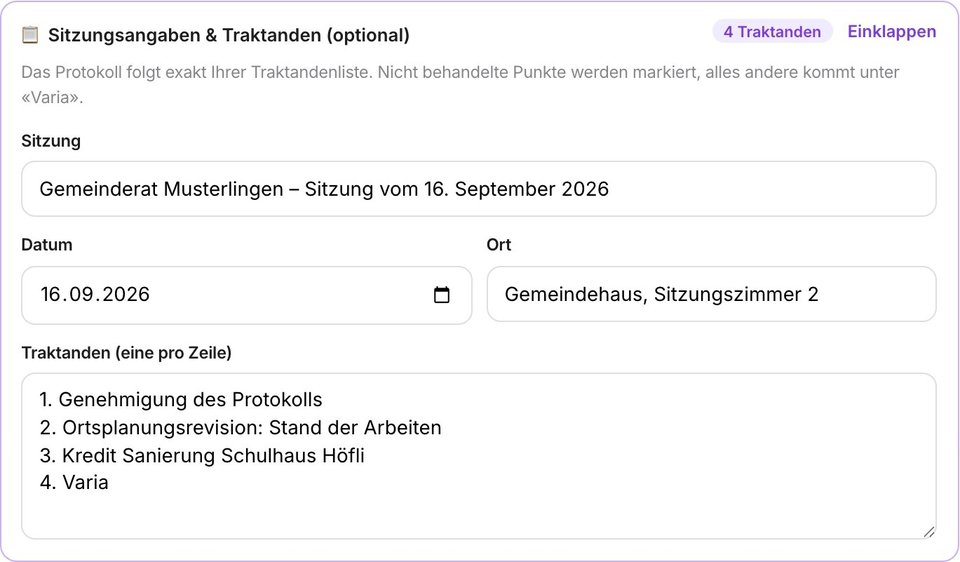
Zusätzlich gibt es das Feld «Namen & Fachbegriffe». Personen, Ortsnamen und Fachbegriffe, die Sie dort eintragen, schreibt die Transkription richtig. Gerade bei Schweizer Dialekten und Flurnamen ist das ein spürbarer Qualitätssprung.
Eigene Protokollvorlage: Logo, Kopf- und Fusszeile
Unter «Vorlage & Organisation» hinterlegen Sie einmal Logo, Kopfzeile und Fusszeile. Ab dann trägt jedes Word- und PDF-Dokument Ihre Gestaltung automatisch. Die Einstellungen gelten für alle Personen Ihrer Organisation, sodass Protokolle aus verschiedenen Händen einheitlich aussehen.
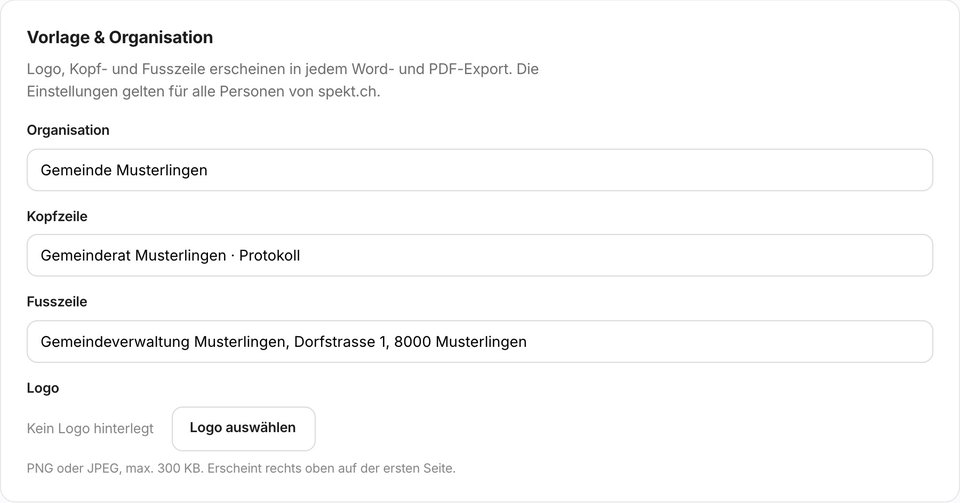
Optional bestimmen Sie eine Administrationsliste. Ist sie leer, dürfen alle Mitglieder der Organisation die Vorlage speichern. Sind Administratoren eingetragen, dürfen nur sie Änderungen vornehmen. Das wird serverseitig durchgesetzt.
Fortlaufende Beschlussnummern, zum Beispiel GRB 12/2026
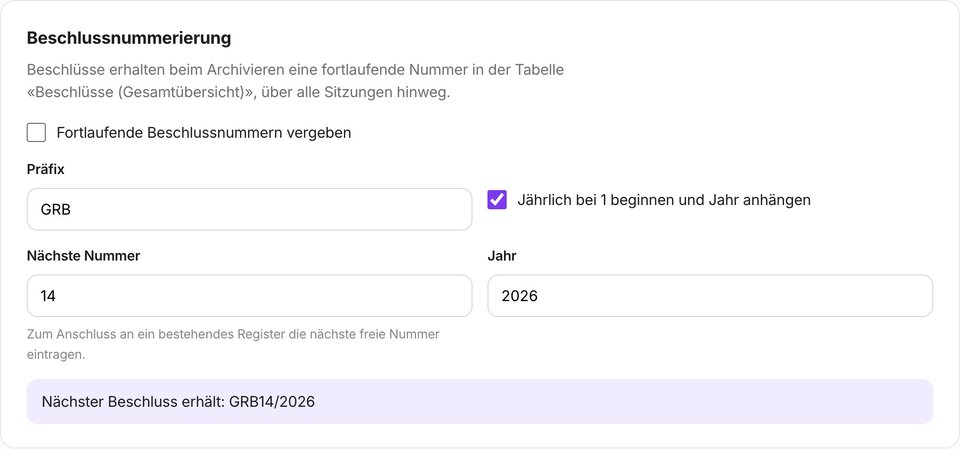
Beschlüsse erhalten beim Archivieren automatisch eine fortlaufende Nummer. Sie wählen Präfix und Jahresformat, etwa «GRB 12/2026» für Gemeinderatsbeschlüsse, und geben die nächste freie Nummer aus Ihrem bestehenden Beschlussregister vor. MINU-AI zählt ab dort weiter. Damit ist das KI-Protokoll anschlussfähig an die Aktenführung, die in Gemeinden und Behörden vorgeschrieben ist.
Freigabe-Workflow: Entwurf, Prüfung, Freigabe, Versand
Ein Sitzungsprotokoll durchläuft in den meisten Gremien einen festen Ablauf. MINU-AI bildet ihn jetzt ab:
- Entwurf: Das KI-Protokoll wird im Editor geprüft und angepasst.
- Zur Prüfung: Der Entwurf geht an den Vorsitz oder die zuständige Person.
- Freigegeben: Das Protokoll wird gesperrt und trägt einen Freigabevermerk.
- Versand: Das freigegebene Protokoll geht als Word und PDF an den hinterlegten Verteiler.
Freigegebene Protokolle lassen sich nicht mehr verändern. Wer nachträglich etwas ändern will, erstellt einen neuen Entwurf. So bleibt jederzeit nachvollziehbar, welcher Stand verteilt wurde.
Laufende Pendenzenliste über alle Sitzungen
Pendenzen aus jedem Protokoll landen in einer Liste pro Organisation, erreichbar über die Seitenleiste. Beim nächsten Protokoll gleicht MINU-AI die offenen Punkte automatisch ab: Was in der Sitzung als erledigt gemeldet wird, wird abgehakt. Neue Termine und Zuständigkeiten werden übernommen. Die Liste lässt sich jederzeit auch von Hand pflegen.
Für Architekturbüros und Planungsbüros mit wöchentlichen Bausitzungen ersetzt das die separat geführte Pendenzenliste in Excel. Für Vereine wird der Vorstand nicht mehr zwischen zwei Sitzungen den Faden verlieren.
Protokoll-Archiv, Editor und bessere Protokollqualität
- Protokoll-Archiv: Jedes Protokoll wird automatisch im Archiv Ihrer Organisation abgelegt. Suchen, ansehen, als Word oder PDF laden. Gespeichert wird nur das fertige Protokoll, nie die Audiodatei und nie das Transkript.
- Bearbeiten vor dem Export: Das Ergebnis lässt sich direkt im Tool anpassen. «Namen oder Begriffe ersetzen» korrigiert eine falsche Schreibweise im ganzen Dokument auf einmal.
- Keine geratenen Sprecherzuordnungen: Wo die Zuordnung unsicher ist, schreibt MINU-AI keinen Namen mehr hin, statt einen falschen zu erfinden.
- Schweizer Formate: Zahlen als 1'250'000, Beträge in CHF, keine leeren Tabellen, Unterschriftenzeilen im Word- und PDF-Export.
- Stabilere Verarbeitung: Lange Aufnahmen werden zuverlässiger in Abschnitte zerlegt, der PDF-Export verträgt Sonderzeichen und Umlaute in allen Feldern.
Neue Navigation, Handbuch, Feedback, Microsoft-Login und TWINT
- Seitenleiste mit Neues Protokoll, Archiv, Pendenzen, Einstellungen und Support. Auf dem Smartphone als Icon-Leiste mit Kurzbezeichnungen.
- Handbuch im Tool: Alle Abläufe von der Aufnahme bis zum freigegebenen Protokoll erklärt, in Deutsch, Englisch, Französisch und Italienisch.
- Feedback-Knopf auf jeder Seite: Fehler, Wunsch oder Anregung melden, mit Screenshot und Markierung. Jede Meldung landet direkt bei mir.
- Anmeldung mit Microsoft: Neben Google und LinkedIn lässt sich ein Konto neu auch mit dem Microsoft-Konto erstellen, praktisch für Verwaltungen mit Microsoft 365.
- TWINT: Das Abo lässt sich neben Kreditkarte auch mit TWINT bezahlen. Viele Gemeinden haben keine Firmenkreditkarte, das war bisher die häufigste Hürde beim Abschluss.
Datenschutz: Was gespeichert wird und was nicht
Die Verarbeitung läuft weiterhin auf EU-Servern. Die Audiodatei wird nach der Transkription gelöscht, das Transkript nach der Protokollerstellung. Neu gespeichert werden nur das fertige Protokoll im Archiv, die Pendenzenliste und die Organisationseinstellungen. Das ist für Gemeinden relevant, die nach DSG und DSGVO nachweisen müssen, welche Daten wo liegen. Details stehen in der Datenschutzerklärung und im Beitrag zu DSGVO-konformen KI-Lösungen.
Vergleich: Generischer KI-Notetaker oder Protokollsoftware für Gremien?
| Funktion | Generische Meeting-Notetaker (z. B. Otter, Fireflies) | MINU-AI seit September 2026 |
|---|---|---|
| Protokoll folgt der Traktandenliste | Nein, Zusammenfassung nach Themen | Ja, exakt nach Ihrer Vorgabe |
| Fortlaufende Beschlussnummern | Nein | Ja, mit Präfix und Jahr |
| Freigabe-Workflow mit Sperre | Nein | Ja, Entwurf bis Versand |
| Pendenzenliste über Sitzungen hinweg | Teilweise, pro Meeting | Ja, pro Organisation, automatisch nachgeführt |
| Word und PDF mit eigenem Logo | Nein, Text-Export | Ja, Vorlage pro Organisation |
| Schweizerdeutsch | Eingeschränkt | Ja |
| Speicherung von Audio | Meist dauerhaft, US-Server | Nein, gelöscht nach Verarbeitung, EU-Server |
| Bezahlung | Kreditkarte, USD | Kreditkarte oder TWINT, CHF |
Einen ausführlichen Vergleich finden Sie im Beitrag Alternativen zu Otter.ai und Fireflies.ai.
Häufige Fragen zum Update
Kann ich eine bestehende Beschlussnummerierung fortführen?
Ja. In den Einstellungen unter «Vorlage & Organisation» legen Sie Präfix, Jahr und die nächste Nummer fest. MINU-AI zählt ab dort fortlaufend weiter, zum Beispiel ab GRB 113/2026.
Was passiert mit Traktanden, die in der Sitzung nicht behandelt wurden?
Sie bleiben im Protokoll an ihrer Stelle und werden als «nicht behandelt» markiert. Themen, die besprochen wurden, aber auf keiner Traktandenliste standen, erscheinen unter «Varia».
Wird die Audioaufnahme im Archiv gespeichert?
Nein. Im Protokoll-Archiv liegt nur das fertige Protokoll. Audiodatei und Transkript werden nach der Verarbeitung gelöscht.
Wer darf Vorlage und Beschlussnummerierung ändern?
Standardmässig alle Personen der Organisation. Optional hinterlegen Sie eine Administrationsliste. Dann dürfen nur diese Personen die Organisationseinstellungen speichern.
Kann ein freigegebenes Protokoll noch verändert werden?
Nein. Sobald ein Protokoll freigegeben ist, ist es gesperrt. Änderungen sind nur an einem neuen Entwurf möglich. So bleibt der freigegebene Stand nachvollziehbar.
Sind die neuen Funktionen im kostenlosen Tarif enthalten?
Ja. Traktanden, Vorlage, Beschlussnummern, Freigabe, Archiv und Pendenzenliste sind für alle Konten freigeschaltet. Der Free-Tarif enthält dauerhaft 60 Minuten Audio pro Monat.
So starten Sie
Öffnen Sie vor Ihrer nächsten Sitzung das Tool, tragen Sie die Traktanden ein, laden Sie danach die Aufnahme hoch. Prüfen Sie den Entwurf, geben Sie ihn frei, verschicken Sie ihn an den Verteiler. Alles Weitere, vom Logo bis zur Beschlussnummer, passiert automatisch. Der Free-Tarif enthält dauerhaft 60 Minuten pro Monat, ohne Kreditkarte. Wer MINU-AI in bestehende Abläufe einbinden will, findet unter Integrationen die REST-API, Zapier und Make sowie die Zoom-Anbindung.
Vieles in diesem Update ist aus Rückmeldungen von Gemeinden und Planungsbüros entstanden. Wenn Ihnen etwas fehlt: Der grüne Feedback-Knopf im Tool ist der kürzeste Weg zu mir.
Häufige Fragen
Kann ich eine bestehende Beschlussnummerierung fortführen?
Ja. In den Einstellungen unter «Vorlage & Organisation» legen Sie Präfix, Jahr und die nächste Nummer fest. MINU-AI zählt ab dort fortlaufend weiter, zum Beispiel ab GRB 113/2026.
Was passiert mit Traktanden, die in der Sitzung nicht behandelt wurden?
Sie bleiben im Protokoll an ihrer Stelle und werden als «nicht behandelt» markiert. Themen, die besprochen wurden, aber auf keiner Traktandenliste standen, erscheinen unter «Varia».
Wird die Audioaufnahme im Archiv gespeichert?
Nein. Im Protokoll-Archiv liegt nur das fertige Protokoll. Audiodatei und Transkript werden nach der Verarbeitung gelöscht.
Wer darf Vorlage und Beschlussnummerierung ändern?
Standardmässig alle Personen der Organisation. Optional hinterlegen Sie eine Administrationsliste. Dann dürfen nur diese Personen die Organisationseinstellungen speichern.
Kann ein freigegebenes Protokoll noch verändert werden?
Nein. Sobald ein Protokoll freigegeben ist, ist es gesperrt. Änderungen sind nur an einem neuen Entwurf möglich. So bleibt der freigegebene Stand nachvollziehbar.
Sind die neuen Funktionen im kostenlosen Tarif enthalten?
Ja. Traktanden, Vorlage, Beschlussnummern, Freigabe, Archiv und Pendenzenliste sind für alle Konten freigeschaltet. Der Free-Tarif enthält dauerhaft 60 Minuten Audio pro Monat.
Sitzungsprotokolle automatisch erstellen
MINU-AI transkribiert Ihre Aufnahmen und erstellt strukturierte Protokolle mit Traktanden, Beschlüssen und Aufgaben — in Minuten statt Stunden.
60 Minuten gratis testen →Keine Kreditkarte · Sofort einsatzbereit
← Zurück zum Blog